Debt Relief Experts



Bank: TD Canada Trust
Website: https://www.td.com/ca/en/personal-banking
Last Updated: August 3, 2021 (information subject to change, so please go to https://www.td.com/ for current details).
Table of Contents
How to open a bank account
You can open a new chequing account online. You will be prompted to provide ID online by taking a photo of your photo ID and a self-portrait. If you are not prompted to verify ID online, you will need to activate the account by verifying ID at your local TD Branch.
Services Offered
- TD ways to bank : Bank online, in-person, by phone or mobile.
- TD Applications – Mobile banking with TD app or bank online through EasyWeb
- TD Mobile Deposit – Deposit cheques through TD mobile banking app
- TD MySpend – Paired with the TD app, use TD MySpend to keep track of your monthly spending and help improve your spending habits.
How To Get a Void Cheque or Pre-Authorized Payment Form
To obtain your account information and download a pre-filled form for Direct Deposits (or Pre-Authorized Debits):
After you log in to EasyWeb:
- Select Accounts in the left menu
- Select the account for which you require Direct Deposit information (or Pre-Authorized Debit Payments)
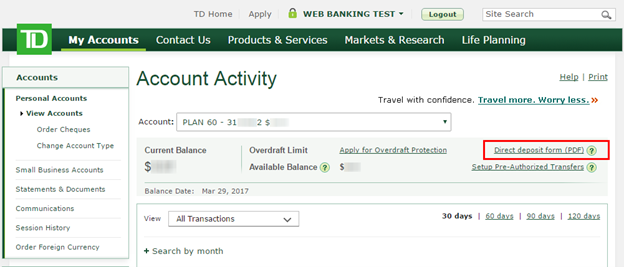
- Once on the Account Activity page, select the “Direct deposit form (PDF)” link on the right side of the page
- You will then get a pop-up page (PDF) pre-filled with your account’s 5-digit Transit (branch) number, 3-digit Institution number (004) and your 7-digit Account number.
- Use the account details provided in this PDF to set up Direct Deposits (or Pre-Authorized Debit Payments).
The PDF form also contains useful information about setting up direct deposit with the federal government and your employer.
How to Set Up CRA Direct Deposit
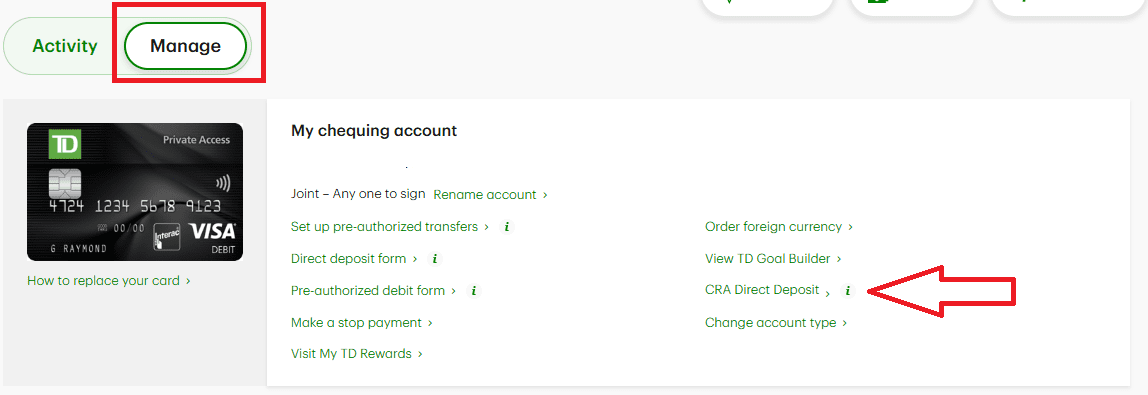
From the TD Banking app (desktop or mobile), select your bank account, and then find the “Manage” tab and select CRA Direct Deposit.